8 Best Tools for Automatic Meeting Notes in 2026 (Free and Paid)
Jan 21, 2026
•
7
MIN READ

AI Summary by Fellow
Every meeting contains decisions, commitments, and context your team needs. The problem? Most of it disappears the moment the call ends.
Automatic meeting notes tools solve this by using AI to capture, transcribe, and organize your conversations without anyone having to split their attention between participating and documenting. Instead of assigning someone to take notes (and inevitably miss things), an AI meeting assistant handles capture automatically while everyone stays present in the discussion.
In this guide, we'll compare the best automatic meeting notes tools for 2026, covering features, pricing, and which scenarios each tool handles best.
Already know you need automatic notes? Start your free Fellow trial today - no credit card required →
What are automatic meeting notes?
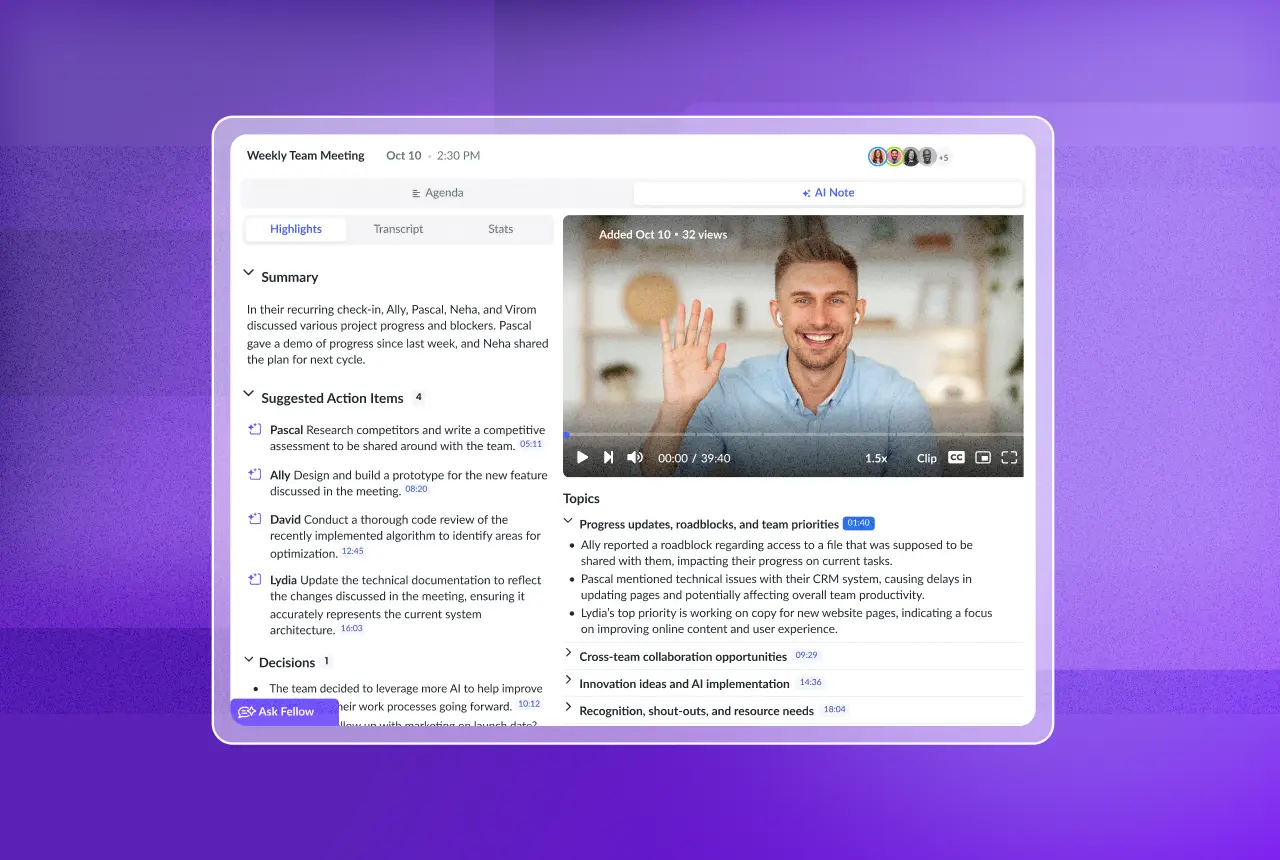
Automatic meeting notes are AI-generated records of your meetings that include transcripts, summaries, action items, and key decisions. These tools join your video calls (or capture audio locally), use speech recognition to transcribe the conversation, then apply AI to identify what matters: who said what, what was decided, and what needs to happen next.
The best automatic meeting notes tools go beyond basic transcription. They create a searchable recording library where you can find any conversation, extract action items with owners and due dates, and integrate directly with project management and CRM systems so follow-ups actually happen.
Looking for a more comprehensive comparison of 22+ tools with enterprise evaluation criteria? See our complete guide to AI meeting assistants.
How to choose an automatic meeting notes tool
Not all automatic meeting notes tools work the same way. Before comparing specific options, consider these factors:
Platform compatibility: Does it work with Zoom, Google Meet, Microsoft Teams, and Slack huddles? Some tools only support one platform.
Recording method: Does it join as a visible bot, or can it record without a bot in the call? Some meetings (like sensitive 1:1s) benefit from botless recording.
Intelligence vs. transcription: Basic tools just transcribe. Advanced tools let you search across all your meetings, ask questions about what was discussed, and surface insights automatically.
Integrations: Can notes and action items sync to your existing tools (Slack, Asana, Jira, Salesforce, HubSpot)?
Security and compliance: For enterprise use, look for SOC 2 Type II certification, HIPAA compliance, and policies that prevent AI training on your data.
8 best automatic meeting notes tools for 2026
1. Fellow
Fellow is a secure AI meeting assistant that turns conversations into searchable, actionable intelligence. It combines accurate transcription with organization-wide search, flexible recording options, and deep workflow integrations.
Best for: Teams that need automatic notes plus the ability to search and query across all their meetings, with enterprise-grade security.
Key features:
AI meeting notes with summaries, action items, and chapters in 90+ languages
Ask Fellow: Query your meeting history with natural questions like "What did we decide about the Q3 roadmap?"
Record with or without a bot in the call (supports in-person meetings and Slack huddles too)
50+ native integrations including Salesforce, HubSpot, Jira, Asana, Slack, and Notion
Privacy controls: SOC 2 Type II, HIPAA, GDPR compliant. No AI training on customer data.
Pricing: Free plan available. Paid plans start at $9/user/month (billed annually).
G2 rating: 4.7/5 (2,200+ reviews)
Why Fellow stands out: Most automatic notes tools just capture individual meetings. Fellow creates a searchable knowledge base across your entire meeting history, so you can find decisions and context from any conversation. Teams at Shopify, HubSpot, Vidyard, and Motive use Fellow to keep meeting intelligence accessible across their organizations.
Start your free Fellow trial →
2. Otter.ai
Otter.ai pioneered real-time transcription that participants can view and annotate during the meeting itself. Its OtterPilot feature handles automated joins and generates live summaries.
Best for: Teams that want to see and interact with transcripts in real-time during meetings.
Key features:
Live transcription visible to all participants
In-meeting chat for commenting on specific moments
Slide capture from screen shares
AI chatbot for asking questions about transcripts
Pricing: Free plan (300 minutes/month). Pro plan $16.99/user/month (6,000 minutes).
G2 rating: 4.2/5 (172 reviews)
Limitations: The 6,000 minute cap on paid plans may not suffice for high-volume meeting organizations. Cross-meeting search and workflow integrations are less developed than dedicated AI meeting assistants.
3. Fireflies.ai
Fireflies.ai offers extensive integrations and an AI search feature (AskFred) that lets you query transcripts conversationally.
Best for: Teams needing to connect meeting notes to many third-party apps, particularly Slack and CRM systems.
Key features:
Transcription in 69+ languages
AskFred AI for conversational transcript search
Broad integration library
API access for custom workflows
Pricing: Free plan with limited credits. Pro plan $10/user/month.
Limitations: The bot's presence is always visible, which some find intrusive for sensitive conversations. Lacks botless recording option.
4. Microsoft Copilot (Teams)
For organizations fully embedded in Microsoft 365, Copilot in Teams provides native automatic meeting notes without additional tools.
Best for: Teams using Microsoft Teams exclusively who want automatic notes without adding new software.
Key features:
Real-time transcription with speaker identification
Meeting summaries and action item extraction
Integration with Outlook, OneDrive, and SharePoint
Can reference emails and files for meeting context
Pricing: Included in Microsoft 365 Business Standard ($12.50/user/month). Full Copilot features require Microsoft 365 Copilot add-on ($30/user/month additional).
Limitations: Only works with Teams meetings. Limited integrations outside Microsoft ecosystem. Summary quality and action item extraction don't match specialized AI meeting assistants.
5. Fathom
Fathom differentiates by offering unlimited recording and transcription on its free plan, making it accessible for individuals and small teams testing AI meeting tools.
Best for: Individuals and small teams who want reliable automatic notes without monthly fees.
Key features:
Unlimited free recordings and transcripts
AI-generated summaries and action items
Highlight and clip creation
Basic CRM integrations on paid plans
Pricing: Free plan with unlimited recordings. Paid plans from $19/user/month.
G2 rating: 4.9/5 (4,000+ reviews)
Limitations: Advanced features (CRM sync, custom vocabulary, team analytics) require paid plans. Enterprise security controls and team collaboration features are minimal.
6. Grain
Grain focuses on creating shareable video clips from meetings, making it popular with product teams and UX researchers who need to build repositories of customer insights.
Best for: Product and research teams conducting user interviews who need to clip and share specific moments.
Key features:
Easy clip creation from transcripts
Organize clips by theme or project
Share highlight reels with stakeholders
Integration with research tools
Pricing: Free plan available. Pro plan $19/user/month.
Limitations: Optimized for research and customer interviews rather than general business meetings. Less useful for executive sessions, sales calls, or team standups.
7. tl;dv
tl;dv provides meeting recordings with AI summaries and timestamps, designed for teams that want quick recaps without watching full recordings.
Best for: Teams that frequently miss meetings and need to catch up quickly on what was discussed.
Key features:
AI summaries with timestamps
Automatic recording of recurring meetings
CRM integrations (Salesforce, HubSpot)
Multi-language support
Pricing: Free plan available. Pro plan $20/user/month.
Limitations: Focuses on individual meeting capture rather than cross-meeting intelligence. Search and querying capabilities are basic compared to full AI meeting assistants.
8. Avoma
Avoma specializes in conversation intelligence for sales and customer-facing teams, analyzing talk ratios, identifying objections, and tracking deal-relevant moments.
Best for: Sales organizations that need automatic notes plus conversation analytics for coaching and deal intelligence.
Key features:
Talk-to-listen ratio analysis
Automatic objection and competitor mention detection
CRM integration with deal stage tracking
Sales coaching features
Pricing: Starts at $19/user/month for basic features. Advanced analytics from $49/user/month.
Limitations: Sales-specific focus makes it less suitable for general organizational use. Product, engineering, and operations teams won't benefit from the specialized analytics that justify the higher price.
Quick comparison: automatic meeting notes tools
Tool | Best for | Botless option | Cross-meeting search | Starting price |
|---|---|---|---|---|
Fellow | Teams needing searchable intelligence + security | ✅ Yes (bot and botless options) | ✅ Yes (Ask Fellow) | Free / $9/mo |
Otter.ai | Real-time collaborative transcription | ✅ Yes | Limited | Free / $16.99/mo |
Fireflies.ai | Broad third-party integrations | ✅ Yes | ✅ Yes (AskFred) | Free / $10/mo |
Microsoft Copilot | Teams-only organizations | ❌ No | Limited | $12.50/mo |
Fathom | Budget-conscious individuals | ❌ No | ❌ No | Free / $19/mo |
Grain | Product research and user interviews | ❌ No | ❌ No | Free / $19/mo |
tl;dv | Quick meeting catch-ups | ❌ No | Limited | Free / $20/mo |
Avoma | Sales conversation intelligence | ❌ No | Limited | $19/mo |
Why do automatic meeting notes improve productivity?
If you're still relying on manual note-taking, you're losing more than just time. Here's what automatic meeting notes actually solve:
Everyone stays engaged. When someone is typing notes, they're not fully participating. Automatic capture lets everyone contribute to the discussion.
Nothing gets lost. Human note-takers miss details, misinterpret statements, and bring unconscious bias to what they emphasize. AI captures everything with consistent accuracy.
Decisions become findable. The real value isn't the transcript itself; it's being able to search across months of conversations to find what was decided, who committed to what, and why.
Action items actually happen. Automatic extraction of tasks with owners and due dates, synced directly to project management tools, means follow-ups don't fall through the cracks.
Async work becomes possible. Team members in different time zones can catch up on meetings they couldn't attend, with full context rather than a brief summary.
If manual note-taking, lost context, or forgotten action items sound familiar, Fellow turns every meeting into searchable intelligence your whole team can access.
Start your free 14-day Fellow trial →
Frequently asked questions
What is the best tool for automatic meeting notes?
The best automatic meeting notes tool depends on your needs. For teams requiring searchable intelligence across all meetings with enterprise security, Fellow is the top choice. It offers flexible recording (with or without bots), Ask Fellow for querying your meeting history, and 50+ integrations. For unlimited free transcription, Fathom works well. For sales-specific conversation intelligence, consider Avoma.
Can I get automatic meeting notes without a bot joining?
Yes. Some AI meeting assistants like Fellow offer botless recording that captures meetings without a visible bot participant. This works by recording locally through desktop applications or browser extensions. Botless recording is ideal for sensitive conversations, executive meetings, or any situation where a visible AI participant feels intrusive.
Are automatic meeting notes secure for enterprise use?
Enterprise-grade automatic meeting notes tools should be SOC 2 Type II certified, HIPAA compliant (for healthcare), and GDPR compliant (for European operations). Critically, verify that the vendor doesn't train AI models on your meeting data. Fellow meets all these requirements and provides granular privacy controls for managing who can access recordings.
How do automatic meeting notes work with action items?
Advanced automatic meeting notes tools use AI to identify action items during conversations, extract them with assigned owners and due dates, and sync them to project management tools like Asana, Jira, Linear, or Monday.com. Fellow's action item tracking automatically detects commitments and integrates with 50+ tools so tasks don't get lost in transcripts.
Can I search across multiple meetings?
Basic transcription tools only let you search within individual meeting transcripts. Full AI meeting assistants like Fellow provide cross-meeting search, letting you query your entire meeting history. With Ask Fellow, you can ask natural questions like "What commitments are at risk?" or "What did the engineering team decide about the API migration?" and get answers drawn from all your accessible meetings.
What's the difference between transcription tools and AI meeting assistants?
Transcription tools convert speech to text. AI meeting assistants go further: they summarize conversations, extract action items, identify decisions, integrate with your workflow tools, and make your meeting history searchable. For a comprehensive comparison of 22 options, see our complete guide to AI meeting assistants and notetakers.
Start capturing your meetings automatically
Every meeting your team holds contains decisions, commitments, and context that someone needs later. Without automatic capture, that intelligence disappears into scattered notes, fading memories, and the dreaded "I thought you were taking notes" conversation.
The best automatic meeting notes tools don't just transcribe. They create searchable, shareable intelligence that keeps your entire organization aligned on what was discussed, what was decided, and what happens next.
Fellow is the secure AI meeting assistant trusted by teams at Shopify, HubSpot, Vidyard, and Motive. Record with or without bots, search across your entire meeting history with Ask Fellow, and connect notes directly to the tools your team already uses.
Fellow auto-joins your video calls to get you the most accurate transcripts, summaries, and action items from your meetings.